Headless CMS vs Traditional CMS: Which is Better for Business Websites
Headless CMS vs Traditional CMS now sits at the center of business strategy, shaping how your website scales, performs, and delivers content across channels.
A content management system has become the backbone of business websites over the last two decades – handling publishing, editing, permissions, and templates. Traditional CMS platforms bundled content and presentation together and pushed everything directly to a website. That model worked when digital meant one primary destination.
Now content feeds mobile apps, portals, campaign pages, and regional sites. Every new touchpoint adds formatting changes, deployment friction, and dependency on development cycles.
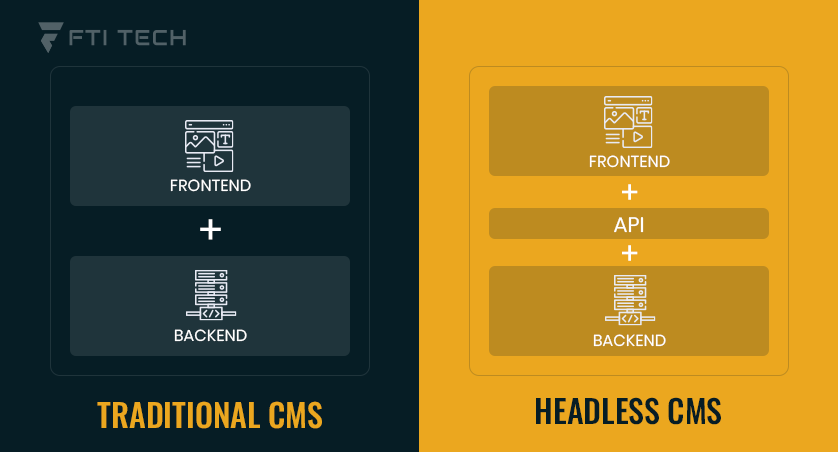
This shift is forcing businesses to rethink architecture. Traditional CMS keeps content and front end tightly connected. Headless CMS separates them and delivers content through APIs.
Traditional CMS has powered websites for years, but is headless CMS the future of business content delivery? Let’s find out.
What is a Traditional CMS?
A traditional CMS is a monolithic or coupled CMS and an all-in-one software. It is a solution whereby the frontend and backend are incorporated as one system. WordPress, Drupal, and Joomla are some of the largest CMS platforms.
What is the Coupling of Content Creation, Storage, and Presentation in a Single System?
Content creation, storage, and presentation are consolidated in a single system in traditional CMS. Essentially, this is a package deal with the interface you write and structure the material, being directly associated with templates that view it.
- Storage and Display – This content is saved in a database that is attached to a particular template or theme.
- Rendering – When a user visits the site, the CMS fetches the required content is out of the database and renders it to the user using an HTML page.
Characteristics of a Conventional CMS
The following are characteristics that qualify a traditional CMS,
- Integrated Frontend and Backend- Traditional CMS is a system that combines the presentation layer (frontend) and the content repository (backend).
- Templates and Themes- The website design is also linked to the presentation of the content. The change in design will need a CMS-based theming engine, and the content would also need to be tailored to that design.
- Integrated Editor- This CMS provides a WYSIWYG (What You See Is What You Get) editor built in. It allows non-technical users to edit and create content and format with ease.
Advantages of Traditional CMS to Businesses
- Installation and Maintenance: These systems are very convenient, and individuals can effortlessly set up websites using these CMS.
- Ideal for Standard Business Sites or Blogs- This is best used with business sites, particularly the SMBs, blogs, and portfolios.
- Plugins and Ecosystem Support: CMS such as WordPress provide an enormous library of plugins and add-on software that enable companies to easily add features.
What is a Headless CMS?
A headless CMS is a backend-only or decoupled content management system. It is a solution whereby the content repository and the presentation layer (head) are separated as distinct systems. Contentful, Strapi, and Sanity platforms follow this CMS model.
What is the API-First Architecture?
With APIs, content management, storage, and delivery are handled with a headless CMS.
- Storage and Delivery- This content is saved in a raw repository that is not attached to a particular template.
- Fetching- CMS works such that when a user requests data, the required content is fetched programmatically using RESTful or GraphQL APIs and delivered to any requesting device.
Characteristics of a Headless CMS
The following are characteristics that qualify a headless CMS,
- No Front-End Layer – Headless CMS is a system in which there is an absence of the presentation layer. It provides a raw content repository rather than a WYSIWYG editor for page design.
- Content Available Anywhere – The content is not linked to a specific website structure. So, it can be pushed simultaneously to apps, IoT devices, and smartwatches.
- Developer Choice of Tech Stack – Developers are not restricted to proprietary tools. They have the freedom to build the frontend using any modern framework like React or Vue.js.
Advantages of Headless CMS to Businesses
- Flexibility and Future-Proofing – These systems are highly flexible, and the businesses can add new devices through API without building content infrastructure.
- Omnichannel Delivery – A single content source can feed multiple platforms, supporting consistent cross-channel publishing.
- Faster Performance – Decoupling of the front-end will allow developers to use the concept of static site generation.
FTI Tech delivers CMS development services that help businesses design and build website architectures aligned to their growth plans – whether that means implementing a scalable Traditional CMS setup or developing a modern Headless CMS ecosystem with custom front-end frameworks.
Traditional CMS vs Headless CMS: Side‑by‑Side Comparison
| Feature | Traditional CMS | Headless CMS |
|---|---|---|
| Architecture | Front-end and back-end tightly integrated; content and presentation are coupled. | Content is separated from the front-end; delivered via APIs for any platform. |
| Flexibility | Limited to pre-built templates and themes; customizations often require workarounds. | Front-end agnostic; developers can use any framework to present content. |
| Omnichannel Delivery | Primarily website-focused; multi-platform support is difficult. | Designed for multiple channels – web, mobile, apps, IoT, kiosks. |
| Developer Dependency | Minimal; non-technical teams can manage content easily. | High; setup and front-end management require developer expertise. |
| Performance | Can slow down with complex sites or high traffic; depends on plugins and hosting. | Fast and scalable; APIs allow optimized delivery to any device. |
| Security | Vulnerable to plugin exploits and core updates; attack surface larger. | Smaller attack surface; APIs can be secured independently. |
| Maintenance | Easier; updates and patches are often plug-and-play. | Requires ongoing developer attention for front-end and integrations. |
Which CMS is Best for Business Websites?
The choice of the right CMS largely relies on the business goals and digital complexity of your company. A Traditional CMS would be typical of small companies, blogs, and teams that need a simple and all-inclusive solution for one site. But for enterprises who need a modern website headless CMS makes more sense.
The priorities given below outline what is needed according to your business requirements:
Content Flexibility & Multichannel Delivery
- Headless CMS- This design is the best when companies need to push content through various media. The backend is independent of the frontend and serves as a single source of truth.
- Traditional CMS- These are page-based and are integrated closely with a particular web architecture. Multi-channel delivery typically requires extensions or custom development.
Developer Control vs Non-Technical User Needs
- Headless CMS- Developers work with more recent frameworks such as React or Next.js, and a technique such as “Static Site Generation” enhances load times.
- Traditional CMS- WYSIWYG editors and drag-and-drop builders are at the advantage of the non-technical user. Ready-made themes can be deployed quickly without any coding.
SEO & Marketing Impact
- Headless CMS- SEO depends on proper frontend implementation, including server-side rendering or static generation. With correct setup, it supports full SEO capabilities.
- Traditional CMS- Includes inbuild SEO plugins and tools that simplify metadata management, sitemaps, and on-page optimization.
Businesses evaluating CMS architecture often benefit from technical guidance during the planning stage. This is where FTI Tech supports organizations in aligning CMS selection with long-term digital strategy.
Also Read: How CMS Development Services Help You Work Smarter and Grow Faster
Use Cases: When and Which to Use?
Depending on your business needs, you can use the following scenarios to make your decision:
Choose Traditional CMS if:
- Small Business or Blog- A local bakery or consultant requires an expert internet presence. Traditional platforms are page-based and offer an all-in-one content and design management in a single interface.
- Minimal Development Resources- Marketing teams wish that they could have complete control without having to rely on IT departments. Drag-and-drop builders and editors allow the publication of content without coding.
- Short Schedules- A startup must have a landing page in a few days. Ready-developed themes can be deployed very quickly over headless solutions that take weeks to develop.
Choose Headless CMS if:
- Omnichannel Strategy- A retail brand provides content to websites, mobile applications, and in-store kiosks at the same time. Headless CMS is a content hub that is channel-agnostic and centralized.
- Enterprise Scalability- Multinational companies deal with stress in traffic and complicated workflows.
Conclusion
In case you have to decide on traditional vs. headless CMS, the decision will be based on the needs of your organization. Traditional CMS systems provide a far easier solution to the development of websites. They are simple, quicker, and more convenient. But they are monolithic.
Therefore, you can not single out the problem and make the site operational despite the fact that one of the elements was affected. A headless CMS at the other end is more functional, and it is used by the requirements of more modern enterprises that focus on omnichannel delivery, flexibility of developers, and optimization of performance across many different platforms.
Before deciding, map your growth plans, channel demands, performance expectations, and internal capabilities. The better CMS is the one that fits how your team actually builds and publishes.
If you’re weighing the trade-offs and need a practical second opinion, contact us. Let’s break down your architecture and roadmap together.