What Happens If You Don’t Update Your Website (Real Business Risks)
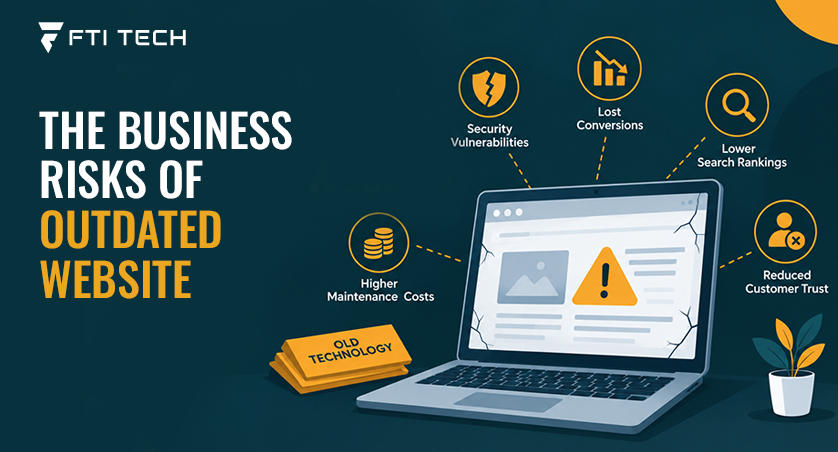
If you don’t update your website, security vulnerabilities, broken functionality, weaker search visibility and lost revenue can all follow. These problems build quietly and often go unnoticed until something breaks. An outdated homepage is usually the smallest problem on that list.
Most people picture an outdated website as a visual problem: a dated layout, an old stock photo. The costlier problems usually sit underneath that – an unpatched plugin, a booking form quietly disconnected from the payment processor it depends on, a pricing page nobody’s touched since last year’s rate increase.
A Quick Way to Check Where You Stand
The fastest way to check is to look at software, functionality, content, performance, security and integrations. Before assuming the site needs a redesign, check whether the technical and functional parts are being maintained:
- Are the CMS, plugins and theme still getting updates?
- Do contact forms still work?
- Are prices and service details accurate?
- Does the site work properly on mobile?
- Are important pages fast enough?
- Are integrations still functioning?
- Are backups working?
- Have security issues been checked recently?
- Are important pages still attracting and converting visitors?
If several of these come back “not sure” or “no,” a more thorough review is worth the time.
The 6 Business Risks of an Outdated or Unmaintained Website
The critical business risks of running an outdated or unmaintained website include severe security vulnerabilities, devastating search engine penalties, plummeting conversion rates, structural compatibility failures, ballooning emergency costs, and permanent reputational damage.
-
Security
Old plugin versions, unsupported software, and unpatched dependencies are the biggest drivers of security risk on a neglected site. A website can run an outdated component for years without incident. The issue is risk: an unpatched vulnerability is a weakness that may eventually get found and used.
-
Search Visibility
When a site stops being useful, search visibility drops. This happens when pricing details go stale; content stops matching what people search for, or pages return errors. The same logic applies to AI-powered search and answer tools – they favor content that’s current, accessible, and clearly structured. There’s no secret “AI ranking factor” to chase; accurate, organized content is the more reliable approach.
-
Poor Performance and Mobile Experience
Visitors experience the time it takes to load, the ease of finding information and whether buttons and forms work properly on their device.
An outdated site may accumulate unnecessary scripts, large media files, inefficient code, or third-party dependencies. Mobile users can feel the impact even more when pages are difficult to navigate or slow to respond.
-
Broken Functionality and Integrations
Broken functionality is the risk that costs the most because nobody notices it. A site can look completely fine while something underneath has failed – a booking tool depends on a third-party API, the provider updates that API, and the connection quietly breaks. Customers click “Book Now”, and nothing happens. This is sometimes called API decay, and it can cost leads long before anyone catches it.
-
Accessibility and Compliance
Keyboard navigation, contrast, alt text, form labels, screen-reader support – these affect whether people can use the site. WCAG provides a technical framework for improving accessibility, but WCAG conformance should not automatically be treated as equivalent to legal compliance. Accessibility obligations vary by location; for example, the ADA in the US, the European Accessibility Act in the EU, and AODA in Ontario – as well as by industry and organization size.
-
Lost Leads, Revenue and Marketing Spend
The cost of an outdated website is not always an obvious repair bill. Suppose a company spends money driving traffic to a landing page, but the form does not work correctly. Or a potential customer reaches the site from an advertisement and finds outdated pricing or service information. The marketing spend still happened, and the visitor still arrived. The opportunity was simply lost somewhere between the two.
That is why website maintenance should be viewed as part of protecting the value of the marketing and sales work built around the site.
What Counts as Updating a Website?
Updating a website means changing its content, design, or technical infrastructure to improve performance, security and user experience.
Content Updates
Content updates are the easiest form of maintenance, but they still get skipped when a business gets busy. This covers prices, services, staff details, contact information, policies, and pages that no longer reflect the business – plus smaller SEO refreshes like meta descriptions and internal links.
CMS and Software Updates
CMS core software, plugins, themes, frameworks, libraries, and other dependencies all need to be reviewed and updated as required. When software reaches the end of its vendor support window, security fixes and compatibility updates may stop, increasing the risk of vulnerabilities and future problems.
Security and Technical Updates
This is the category where neglect creates the most business risk, because it’s invisible until something goes wrong. It covers patching, vulnerability remediation, server configuration, SSL/TLS, access controls, monitoring, backups and occasional server or hosting migrations.
Performance and UX Updates
Performance problems build up in small increments. Page speed, mobile usability, Core Web Vitals, image and script weight, navigation, forms, and checkout all fall here – and small inefficiencies compound into real friction over time. This is also where professional web design tends to make a practical difference.
Integration and API Updates
Integrations break silently because failure usually happens on someone else’s end. CRM connections, payment systems, booking platforms, analytics, and authentication services all rely on outside systems that can change without warning – quietly breaking the connection. Fixing this sometimes requires custom web development rather than a routine update.
How Website Problems Compound Over Time
Problems compound because small technical debt multiplies through database bloat and shifts search until it becomes a real performance, security, or visibility failure.

Small, unknown content and technical changes sum up into major performance, security and visibility issues. A skipped update can create a compatibility or security gap. That can lead to a feature failing, which creates friction for customers and potentially costs the business leads or transactions. Eventually, the problem may require emergency repair – often at a higher cost. Not every neglected site follows this path exactly, but it’s common enough to explain why maintenance tends to be cheaper than triage.
How Often Should You Update Your Website?
It depends on what part of the site you’re looking at. Security issues need attention the moment they’re found; content and plugins are worth a monthly or quarterly look; a full redesign usually only needs revisiting every few years.
| Area | Recommended approach |
|---|---|
| Security issues | As soon as found – don’t wait for a schedule |
| CMS and core software | Review monthly |
| Plugins and dependencies | Check and update monthly |
| Website content | Update as details change; review quarterly |
| Forms and critical functions | Test monthly |
| Performance | Monitor continuously |
| Accessibility | Review after major changes, at least annually |
| Integrations | Review whenever a connected service changes |
| Backups | Run automatically; test restoration quarterly |
| Full redesign | Reassess every 2 to 5 years |
DIY vs Professional Website Maintenance
The DIY vs professional website maintenance depends on your budget and the time you spend on technical issues. Professional website maintenance is more appropriate for technical work such as security remediation, server changes, complex integrations, migrations, and major performance problems. DIY website maintenance involves changes such as checking for updates, backups, and security checks.
| Task | DIY | Professional help |
|---|---|---|
| Editing text | Yes | Not needed |
| Updating images | Yes | Not needed |
| Adding basic pages | Yes | Not needed |
| CMS updates | Depends on complexity | Recommended |
| Security remediation | Not recommended | Recommended |
| Server changes | Not recommended | Recommended |
| Complex integrations | Not recommended | Recommended |
| Major performance problems | Not recommended | Recommended |
| Website migration | Not recommended | Recommended |
| Accessibility remediation | Depends | Often useful |
Content maintenance and technical maintenance are different skills. Someone can be perfectly capable of updating a phone number or adding a service page while still needing help with a vulnerable plugin, a broken API, or a server misconfiguration. One doesn’t substitute for the other. For businesses that need support across these areas, FTI Tech provides website services covering both design and technical development.
What If You Don’t Have the Budget to Update Everything?
When you cannot afford a full-scale renovation, focus limited funds on the fixes with the most business impact rather than a full rebuild. Start with security, then revenue-critical functionality such as forms, checkout, and booking.
Next, fix inaccurate customer-facing information, followed by performance and accessibility issues. SEO and broader content improvements can follow, with cosmetic redesign last. A dated visual style may affect perception, but a security vulnerability or broken booking form can directly expose the business to risk or lost revenue.
If several of these issues require professional attention, talk to our team before deciding whether the site needs maintenance, modernization, or a larger rebuild.
FAQs About Website Maintenance
Can I update WordPress myself, or do I need a developer?
You can easily update WordPress core, themes, and plugins yourself using the built-in one-click dashboard button, provided your site has a simple setup and an active backup. Where DIY gets risky is security hardening — misconfigured settings like exposed login pages and weak file permissions are common even on actively updated sites, and fixing them usually needs a developer’s eye.
Why does my website feel slow even after I’ve optimized images?
Images are only one piece of the puzzle, and other bottlenecks in your code, server, or scripts are holding back performance. Slow-feeling pages are often a Largest Contentful Paint problem rather than a general speed issue.
Are outdated plugins dangerous even if my site hasn’t been hacked yet?
Yes. An unpatched vulnerability is a weakness even if your site has not been hacked yet because they leave open security holes that automated hacker bots scan for and exploit around the clock.
Should I build custom or use a no-code tool when I rebuild?
Use a no-code tool if you need speed at low cost, but build a custom solution if your app requires complex logic, high scale, or total data ownership. The right call comes down to whether you’re picking between no-code and custom development for a simple site or a more demanding one.
Does an old website always need a full redesign?
Not necessarily. A site can be several years old and still perform well if its underlying software, security, and content have been maintained. Redesign becomes the right call when the structure, technology, or accessibility no longer fits current business needs.